• Home
  • Blog
  • Archives
  • Links
  • About
  • Guest Blogger
  • Contact

Tricia's Musings

Random Thoughts about life in general, living in the big city of Toronto

  • Home and Lifestyle
  • Recreation
  • Health Fitness and Beauty
  • Entertainment
  • Web and Technology


You are here: Home / Archives for Web and Technology

Poyperp0st Direct is best for advertisers and bloggers

May 30, 2007 by Tricia

In the early morning hours of May, 24th, Pay/perp0st launched Pay/perp0st Direct. P Direct, as it’s come to be known in the short time that it has existed, was created to let bloggers interact and accept advertising offers directly from advertisers. Just as the name implies.

Over the last year I’ve work with a number of companies that have been created in order to allow advertisers to use a new form of advertising to promote their companies, services, or products on blogs. Each company is a little bit different from the other in the way that they do business with bloggers and advertisers.

Poy/perp0st direct is the best deal around:

I can only speak as a blogger, as I’ve never signed up with any of these companies to create advertising opportunities of my own. Therefore, from a bloggers standpoint, I have to say that P Direct offers both the blogger and the advertiser the best deal all round. Pay/perP0st direct only charges an extra 10% on top of the fee that the blogger sets as his or her price for a post. 5% of that fee goes towards covering the cost of Paypal and credit card transactions.

I say this because I know that each of these companies either take fees from the bloggers stated price for writing a paid post, or they add fees on top of what the blogger is paid to write an article.

I’ll break it down for you.

The original, and still available Pay/perp0st:

Pay/perp0st still allows bloggers to get paid to bl0g through the system that they began using back in July of 2006. That system allows advertisers to create advertising opportunities for whatever amount they’d like to pay, with the minimum payout to the blogger being $5. The bloggers can then pick and choose which opportunities they’d like to create as a post on their blog.

On Pay/perp0st this method of advertising costs advertisers a $5 service fee whether they create 1 opportunity or several hundred. There’s also a 35% charge on top of each opportunities fee. An advertiser could get 14 posts for $99.50 for a cost of $6.75 per post. The blogger would get $5 for a post that costs the advertiser $6.75.

100% markup at Rev1ewMe

Sites like Rev1ewMe have 100% markup. Tricia’s Musings is listed in the Rev1ewMe marketplace. When an advertiser decides to have me write a post through Rev1ewMe my price per post is listed at $150 at Rev1ewMe. I only get $75 of that fee, and Rev1ewMe gets the rest. I don’t know if Rev1ewMe charges the advertiser any other fees on top of the outright fee of $150 that he or she would have to pay to have me discuss their site or product on this blog.

I believe the lowest price that a blogger can charge at Rev1ewMe is $40, with of course $20 going to the blogger, and $20 going to Rev1ewMe if that bloggers site is chosen for a post.

35% removed from bid price at Sp0nsoredRev1ews

Spons0redRev1ews takes 35% of whatever I bid on any advertising opportunities that are listed in their marketplace. The amount that I bid on Sp0nsoredRevi1ews depends on what the advertiser is asking for, and what price limits they have set.

If an advertiser posts an opportunity and they say they are willing to pay between $10 and $125 for a post, well, I’ll usually bid $80 for a post on this blog. A bid of $80 would pay me $52 for a post if my bid was accepted, with the other 35% going to Sp0nsored Rev1ews. Again, I don’t know if Spons0redRev1ews charges advertisers any other fees on top of the full price bid by each blogger.

The lowest price an advertiser can list on Sp0nsoredRev1ews is $5, but with 35% being taken off the bid it’s really not worth it for a blogger to do a post for $3.25.

There are several other companies out there where advertisers may create writing opportunities for bloggers. The fees vary at each of the companies.

Pay/perp0st Direct:

P Direct is just the first part of a new Pay/perp0st release. I believe the second part will be the creation of a marketplace on Pay/perp0st where advertisers could easily pick and choose which blogs they’d like to offer a direct writing opportunity. I don’t know yet if Pay/perp0st will increase their low 10% service charge for advertisers that use the marketplace, but if they do, I would imagine that it will still be the lowest price of any service.

The way P Direct works at this time is:

1. Bloggers place a P Direct Badge on their site. Mine is located in the top left sidebar.

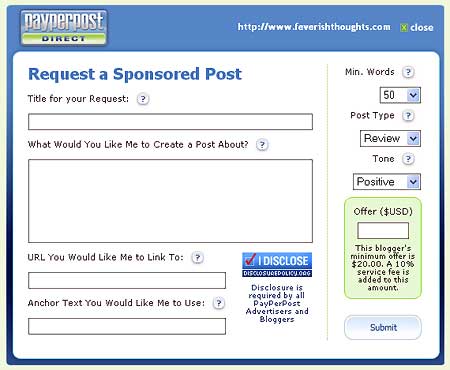
2. If an advertiser, or perhaps another blogger happens across a blog with a Badge on the site, and they decide that they’d like to have that blogger write about their website, company, product or service they can simply click on the badge and a form will pop up that looks like this:
pdirectcreateoffer.jpg

If the form comes up with an error the advertiser should be sure that they are using the address listed in the top right of the pop up form. Sometimes the inclusion or exclusion of the www causes an error. I believe that is fixed now, but if you get an error you know what you should try – check that the url is the same as what’s listed.

3. The advertiser would then fill out the form, listing exactly what they’d like the blogger to write about, and specify the amount of words from 50 to 300, whether the post is a detailed write up, buzz or opinion, and the tone of the post. At this time the tone is set by default to positive, but the an advertiser could choose neutral or negative if they’d like.

Considering that most bloggers write their best posts in a neutral tone, and are not comfortable with being asked to write a positive article my suggestion would be for Pay/perp0st to make the default tone neutral. I for one prefer neutral requests.

The lower right corner of the offer form clearly states what the bloggers minimum fee is set at, and that there will be a 10% charge on top of the fee offered.

At this time I’ve set my fee at the low price of $20. I believe this is an excellent price for a detailed article such as this one on a popular blog.

An advertiser using P direct to request a post would be charge 10% on top of my $20 charge for a total cost of $22. Considering that an advertiser would pay 35% to 50% more, plus possible service fees either through regular Pay/perp0st, Rev1ewMe, Sp0nsored Rev1ews, or another service I think this is a pretty good deal.

4. Once an advertiser has finished creating their P Direct offer they would hit the submit button and I believe they will be taken to the Pay/perp0st website where they can either sign in with their existing advertising account information, or create a brand new advertising account. The advertiser would also have to deposit money into their advertising account to cover the cost of the offer they just created. I believe that an advertiser can use a credit card or Paypal for their payment.

5. The blogger would then be sent an email message telling them that they have a new P Direct offer. To discover exactly what the offer is the blogger would have to sign into their Pay/perp0st account and visit the P Direct area by clicking on the Opportunities tab in the dashboard.

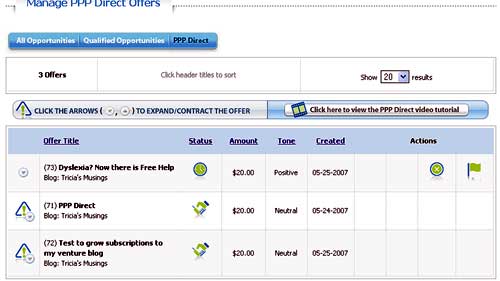
The P Direct area as viewed by a blogger:
pdirectpage.jpg

6. They would be able to see any P offers that they have waiting once they reach the P Direct area. A blogger could use the arrow buttons on the left of each offer to expand one offer at a time in order to see the specific offer.

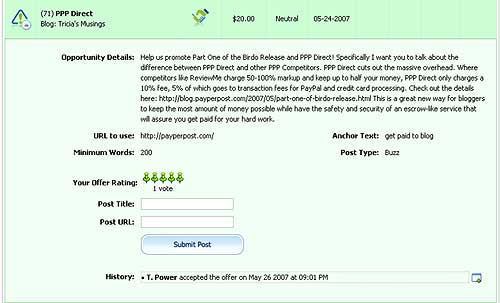
Here’s what this P Direct offer looked like:
pdirectoffer.jpg

7. The blogger could accept the opportunity immediately or, if a blogger decided that the request deserved a higher price due to amount of words or links requested, or would prefer a different tone of post than was requested by the advertiser they could click on the negotiate button and send a message to the advertiser, to which the advertiser would have to respond in order for the blogger to be able to accept or decline the offer.

To learn more about how the P Direct system works for advertisers and bloggers you can view the video in this Pay/perp0st Direct blog post. The video is an excellent tutorial and I only wish that they had more tutorial videos throughout the whole Pay/perp0st website.

Why use P Direct?

Now the big question. Why would a blogger and advertiser use this system rather than deal with each other directly? For security reasons of course. Pay/perp0st offers the security and safety of an escrow-like service.

The money deposited for the post is held while the blogger writes the post. The advertiser has up to four days from the time the completed post is submitted to decide if they approve of the post or not. During that time period the advertiser could also request changes to the post if necessary. Payment is made to the blogger when the advertiser is happy with the post, or once the four day time period elapses.

Sure, bloggers and advertisers could deal directly with each other but what happens if payment isn’t made when stated or when one party isn’t happy. Wouldn’t it be nice to have the security of that middleman?




Filed Under: Cool stuff, Internet, Make Money, Money, Sales and Marketing, Services, The Blogisphere, Web and Technology, Website Promotion, Writing Tagged With: amount of words, blogger, business, card payment, company, credit, credit tone, deal, email, information, low price, lowest charge, lowest price, media, Money, negative tone, neutral tone, offer, paypal, paypal payment, positive tone, posts, price, prices, Product, promote, service, service charges, service fees, special, special deal, special price, style, Video, visit, website, words, write, Writing

If you need a gift for Fathers day visit Designer Gifts

May 27, 2007 by Tricia

designergifts.gif

Fathers day is coming up and if you haven’t already purchased a gift for your dad or husband you might want to visit Designer Gifts, an online gift store, and check out the Gift ideas for men section.

I’ve actually been asked to do do a full article of the online store Designer Gifts. I’ll begin with the look and feel of the site.

I quite like the colors that they’ve chosen for their website.

Do you see the colors in the site logo at the beginning of this post? The whole layout is white, yellow and purple. They’ve used rounded corners on the borders of the navigation menu and listing headers and I really do like that look, although, on the main page, the sections highlighting some of the feature sections of the site seem a little crowded. Perhaps if those sections had a bit of white space between them it might be a little easier on the eye. Don’t get me wrong, there’s nothing wrong with the design or layout of this site, I’m just stating my own opinion and preferences.

I’m sure that the menu has been designed so that the items that they sell most frequently, or the sections that they find visitors go to most often, are listed near the top, however the sales section is listed at the bottom and my preference would be that it be placed closer to the top of the menu as I think many people going to a site to look for gifts would be interested in checking out what’s on sale first.

The menu itself is quite nice. Use your mouse to hover over a section and an additional menu pops outward to show you sub-sections in that category. The only problem I found with the menu system is that while using FireFox and Internet Explorer I can’t see the very first item listed in the sub-menu for the Gift Baskets category, nor the Picture Frame and On Sale!!! section. The on sale section has the largest submenu, perhaps the website owner/designer is aware of this problem and that is why they placed this category at the bottom of the menu section.

This isn’t a huge problem because if you go to the main page for the categories that I listed as not being able to see the full submenu you can still see all of the sub-menu listings in the form of well designed thumbnails for each sub section of a category.

When you are looking for a gift for someone, but you are on a budget, it’s always nice when you visit a site that lists gift ideas either in a shop by price manner like Designer Gifts does, or that has a Cheap gifts section, which Designer Gifts also does.

The Cheap Gifts section has banners or image headings similar to this one, on the right, throughout the section. I quite like the way the “signs” are written as I like the font and the color of the lettering but I’m not sure I like the masked bright idea man quite as much. If he were only here and there throughout the section, I might like him better, but he’s all over the place in that section. Again this is my personal opinion. I think the bright idea man is kind of cute and I’m sure others would love the guy. I just think he might be overused to some extent.

Now, the real meat of any store, online or otherwise is the products that they sell. I found a few very small problems with the sites design, but I have absolutely no problem with the items that Designer Gifts sell.

All of the items appear to be quality items, well designed and seem to have been picked out for the store with care and attention to detail. I took a peek at the gifts under $15 section and I was quite surprised to see some very nice items that I’m sure would cost at least twice their price in a retail store.

One of the gift ideas that I really like, that can be found in the Picture Frames section, are the Digital picture frames. I think that this would make a really cool gift idea.

yhst-14225438739274_1951_27052926.gif

This particular digital picture frame is on sale for $99.00 and it’s made by Mustek. I used to have a scanner made by that company and I can vouch that that they make good products.

This picture frame can display hundreds of JPEG photos. The photos are stored on SD, MMC, Memory Stick or other popular memory card formats. Use the frame to display a selection of photos or an MPEG movie. You can even add music to your display for a full multimedia experience.

I’d never really taken the time to look into these Digital Frames before, but now that I have finally taken a look at whats available I’m quite pleased with the technology. Don’t you agree that a digital picture frame would make a wonderful gift?

Take a look at the Designer Gifts store yourself and see if you don’t also think that they have a wonderful selection of gifts. There must be 1000’s of items to choose from – go check it out and let me know if you bought anything.

Filed Under: Cool stuff, Gifts, Home and Lifestyle, Home Decor, Shopping, Web and Technology Tagged With: cheap gifts, Designer gifts, Digital, digital photo frames, gift, Gift ideas, gift ideas by price, Gifts, online store, photos

Trouble getting some reviews done!

May 27, 2007 by Tricia

Oh dear. I’m doing some work for some advertisers today, on this site and another, and I’m having trouble submitting my finished links! The jobs are due today so this is a real problem!

Other than putting in a support ticket with the company I have no idea what else I can do! I may lose the job! ARghhhh! Well, I guess I’ll write my posts anyway and see what happens.

BTW one of the problems I’m having, a different problem, is with P direct. I sent a thank you note to one of the advertisers who requested that I do a post for them. In this note I told them that I’d be “accepting” their offer in a moment. Well, I didn’t realize that using the “negotiate” button would make the accept offer button disappear. If you are the advertiser that requested a review, please go back to Pay/PerP0st and I guess, say yes to my negotiation, which as I said was only a thank you note, and then I can accept the offer and finish the work for you.

Filed Under: Home and Lifestyle, Sales and Marketing, Web and Technology Tagged With: posts, support, thank you, ticket, work, write

Melbourne IT offers SEO solutions for your business

May 25, 2007 by Tricia

Lately almost every blogger I know has been interested in improving their website’s visibility in search engines. This often involves attempting to get their website to come up on the front page listings (top 10) of major search engines such as Google, Yahoo! and MSN (Live).

I can imagine how important search engine optimization is for small and large sized businesses and corporations. If we, the smaller website owners, think about search engine optimisation all the time, they must live and breathe it.

If you’re a business owner or work for a company that’s interested in improving their search engine ranking, you’ll be pleased to know that Melbourne IT provides search engine optimisation solutions to Australian and global businesses.

The company has a few different packages that they’ve created to optimise your website for search engine rankings.

SEO Kickstart and SEO Kickstart Expert provide entry level diagnostic reports and are an ideal way to get you started toward improved search engine rankings. An analysis of your website is done to identify different areas of optimisation, and compares your home page against your competitors for the top 10 keyword phrases in your target market.

Melbourne IT also offers a Customized Search Engine Optimization solution. This is suited to your business needs and requirements. You will be provided with your own online marketing consultant who will guide you through the entire optimization process. You are also provided with a detailed website competitor report and full website audit and enhancement document.

Visit Melbourne IT for more information about their Search Engine Optimization solutions.

Filed Under: SEO, Web and Technology, Website Promotion Tagged With: business, company, custom solutions, Global, keyphrase, keywords, marketing, optimisation, optimise your site, optimization, page rank, search engine, Search engine optimisation, Search engine optimization, SEO, support

Don’t forget about the Do follow blogroll!

May 25, 2007 by Tricia

I just wanted to remind everyone that if you are an I follow or do follow blogger that you are eligible to join the Do follow blogroll that I created about five weeks ago.

There are close to 160 blogs listed on this blogroll already. It’s going to be huge!

How do you become a do follow blogger? It’s pretty easy really. Simply remove the nofollow tags from the comment area of your template.

Most blogging platforms come with nofollow tags built into the comment area. This was originally thought to be a way to deter spammers because their links wouldn’t be picked up by the search engines when they had the nofollow tag immediately placed on them.

Today, most blogging platforms have plugins or modules that can be added to them that catch spam and stop it before it gets into your blogs comment section. Blogging platforms that don’t have the ability to add these special modules or plugins can still put comments on moderation to prevent spam from reaching the blog.

So that kind of makes the nofollow tags obsolete doesn’t it.

I removed my nofollow tags about a year ago because I wanted to allow anyone who left me a comment a real link. By this I mean, without the nofollow tags the search engines would be able to find the link that the commenter left when they created their comment and they’d gain a backlink to their site on the search engines as a result.

If you aren’t sure what a backlink is please click on the link I just included for the word Backlink above.

So, if you are an I follow blogger that means you are rewarding those who stop to leave you a comment.

As I was saying, to qualify for the do follow blogroll, nofollow tags must be removed from your comment area, and your comment section should NOT be closed to only registered members. Visit the Do Follow blogroll page to learn more about the blogroll, then, if you are interested leave me a message and I’ll send you an email that includes the blogroll code and further instructions.

______________________________________

If you are already on the Do follow blogroll, or if you’ve come across it in some of the D-Lists that are going around, please do not abuse the sites you visit by leaving poor comments.

Comments such as “nice post”, “funny ha ha” and so on do not really add to the post, and when a person goes around to 50 or 100 sites leaving short little comments such as that it looks like they are doing it only to gain the back links that we, do follow bloggers, offer.

Yes there are times when short one line comments are appropriate, but I see too many of them, especially on all my sites on the same day, by the same person? Sorry, I delete them.

I enjoy valid comments on my site. By valid comments I mean ones that actually add to the posts conversation in some way. Share your own experience of what the blogger is posting about in your comment, add facts, or opinions, but please don’t just say “Nice Post”.

Filed Under: Internet, Linky Love, The Blogisphere, Web and Technology Tagged With: blog, blogger, Blogging, Blogroll, blogs, comment, Do follow, do follow bloggers, do follow blogroll, email, I follow, nofollow tags, open comments, plugin, posting, posts, remove nofollow tags, search engine, search engines, Spam, valid comments

  • « Previous Page
  • 1
  • …
  • 49
  • 50
  • 51
  • 52
  • 53
  • …
  • 108
  • Next Page »

Connect with Us

  • Facebook
  • Flickr
  • Instagram
  • RSS
  • Twitter

Categories

Sites of Interest

Useful Links

Eavestrough Cleaning Toronto

Shopping

Gifts, Gadgets,
Books and More!

Recent Posts

  • Is your home well insulated or do you have energy leaks?
  • Pet Safety Tips
  • Top 10 Most Fundamental Yoga Poses For Beginners
  • Will My Interior Décor Stand The Test Of Time?
  • Outdoor Furniture- Spicing Up Your Backyard
  • Ensuring You Have A Good Experience Staying At Hotels With Children
  • Mother’s Day Cookies

Recent Comments

  • Bill on Top 10 Most Fundamental Yoga Poses For Beginners
  • [bonus]old school new body-f4x workout on Why does my husband always bring home the wrong stuff?
  • Rodhe Stevens on 5 Little Known Secrets To Finding Cheap (But Durable) Furniture
  • Julia Carlson on How To Install A Mosaic Tile Kitchen Backsplash
  • Humane Raccoon Deterrent Idea on Helped save a baby raccoon last night

Subscribe


Subscribe to our RSS Feed It's FREE!

Subscribe to Tricia's Musings by Email It's FREE!


Follow me on TWITTER

Find us on Google +


Find us on Facebook


I have two mottos-
1. Live life to the fullest; and
2. Don't have any regrets.

Get More Traffic

Visitors since 2006

Meta

  • Log in
  • Entries feed
  • Comments feed
  • WordPress.org

Search this site

Tags

blog blogs camera Canada Chris computer crohns dinner dog Family flower flowers Food friends funny garden Gardening Green Thumb Sunday Health and Fitness Health Fitness and Beauty holiday home Home and Lifestyle house husband IBD Inflammatory bowel disease Internet Music neighbors pain photo photos plants puppy Shopping sick sleep spring Toronto TV Video visit website Wordless Wednesday

Blogs I Visit

  • RennyBAs Terella
  • Organic Gardening Tips
  • Ah Ok Lah
  • BlogTO
  • Shopping Maniac

Copyright © 2026 · Lifestyle Pro Theme on Genesis Framework · WordPress · Log in