• Home
  • Blog
  • Archives
  • Links
  • About
  • Guest Blogger
  • Contact

Tricia's Musings

Random Thoughts about life in general, living in the big city of Toronto

  • Home and Lifestyle
  • Recreation
  • Health Fitness and Beauty
  • Entertainment
  • Web and Technology


You are here: Home / Archives for Web and Technology / Web Hosting

Anyone having problems with Hostgator lately?

May 5, 2009 by Tricia

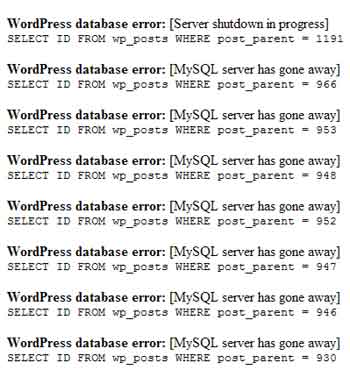
I’m having hosting problems again. If you’re a regular visitor to this site you’ve probably noticed that at times my blog (and all the other blogs I write) load really slow and sometimes you’ll see error messages scattered throughout the page as well.

I’ve also had problems with my Wp-posts databases crashing and needing repair too. Plus I often can’t edit old posts and get error messages when I try. Nor can I always post when I want to because of server slowness or errors. I’m just about at my wits end.

This started happening near the end of March. I think the reason my sites are having trouble is because HostGator upgraded their MySql to PHP 5.1 and it’s causing all the errors and slow load times.

Anyone else on HostGator experiencing problems in the last month or so? I’m sure there’s a few, as I’ve noticed some of the blogs I visit regularly loading really really slowly lately when they didn’t have problems in the past.

If they don’t fix the problem soon ie go back to a trouble free version of PHP I may be forced to look for a new host. I hate that idea! I’ve loved Hostgator since I started with them in 2007 after a terrible experience with Lunarpages.

Any suggestions? I have over 20 websites and blogs now with more on the way so I need a very good shared hosting package from a company that doesn’t overcrowded/oversell their servers or else move up to VPS hosting.

Speaking of Lunarpages … I finally transferred some of my old domains from their service in April. I didn’t have a hosting account with them any longer, but when I left I let them continue to handle my domains registration … bad move as this meant I had to deal with support several times each year begging them to renew my domains. Believe me, their support people need support and sales training in a big way! Anyway … my domains are now with GoDaddy … but get this … Lunarpages sent me a renewal notice today for one of my domains that they no longer control! So I’m still stuck dealing with their support trying to tell them that I really don’t have anything to do with them anymore! Arghhhh! Frustrating! They’d better not try to bill me!

So again, if you have any good hosting suggestions I’d love to hear about it, plus if you have any hosting horror stories feel free to pass that on too. LOL


Filed Under: Blogging, Internet, Items to Try, Web and Technology, Web Hosting, Wordpress Tagged With: 5.1, error messages, frustrated, hostgator, mySql, PHP, problems, slow load, slow server, suggestions, upgrade, web host, wp-post crash

I thought I lost my WordPress Database just now! Scary!

September 18, 2008 by Tricia

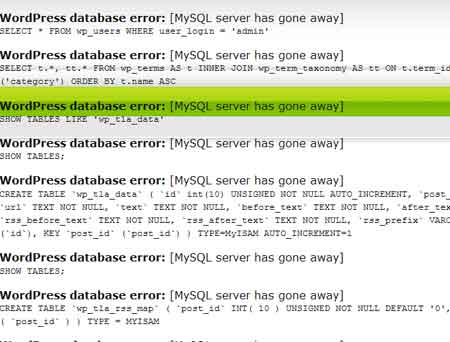
A few minutes ago as I finished the post below and pressed the Publish button this is what my admin area looked like:

Blog Admin Error After Posting

Pretty scary, eh? I just about had a heart attack!

With the mantra “Oh no, oh no, oh no” going through my head, I opened up a new tab in my browser and loaded the site in the hopes that the blog would look normal. You know … that maybe what I saw in the admin area was just a temporary glitch?

No such luck … the front page of the blog looked like this:

Front page of my blog after publishing a post!

After having another heart attack and aging 10 years (gotta get some wrinkle cream now!) I decided to go to my webhost and check C-panel to make sure that my database really hadn’t disappeared.

The database was still there and I could see that it still had comment and post data in it, so i decided to open another new tab in order to load my blog again. I got the same error messages all over the page, so I added wp-admin to the url and I was able to go directly to the admin area.

Much to my relief the admin area looked fine when I got into it. I use a wp-cache for this blog so I went to the settings area and cleared the whole cache for the blog and it looked normal again.

I have no idea what happened, but it sure scared me! This is my oldest and biggest blog. The thought of losing the whole database and possibly the databases for my other blogs really freaked me out.

I just updated this blog to WP 2.6.2 on Saturday. Up until now there’s been no major problems except for the widget area looking strange on occasion. I wrote about that one one of my other blogs if you want to read about the widget problem. You can actually read about how fun it was to update 16 blogs in that post if you’re interested in hearing about my experiment with the WordPress Autoupdate plugin.

At least having just updated my blog I do have recent backups of the database and files.

So I don’t know if this was a problem caused by the new WP 2.6 or if perhaps there was an error on my hosts server when I was publishing my last post. I suppose it could also be a plugin conflict, but I haven’t added any new plugins or updated any since Saturday when I updated WordPress, and I’ve published several posts since then … so that doesn’t make sense as the cause of the problem.

I guess I’ll have to see what happens when I publish this post! Wish me luck!

Has anyone else had a problem like this immediately after publishing a new post? If you have experienced this type or error, did you ever find out what caused it? Any ideas?

Filed Under: Blogging, Software, Web and Technology, Web Hosting, Wordpress, Wordpress Plugins Tagged With: admin, blog, Blogging, cache, cpanel, data, database, databases, error, errors, freaked, freaky, frightening, index, mySql, plugins, post, posting, problem, published, scary, site, Stress, Tech, update, updated, website, Wordpress, yikes

Comment Relish- the WP plugin that greets new commentors

August 10, 2008 by Tricia

What would you think if I added a plugin to my site that would keep track of new commenter and send them a personal greeting?

The plugin is Comment Relish and it identifies new commentors and allows the blog owner to automatically send out a pre-defined message to that new visitor.

With so many new blogs being created daily sometimes you need an edge to grab that first time visitor or well in this case commentors attention. They’ve already like what you posted enough to leave a comment. Why not send them a greeting welcoming them to your site and thanking them for their visit? While you’re at it you could also list your RSS feed and email newsletter subscription link or possibly introduce your new visitor/commentor to another similar blog that you write.

I need your opinion

If you were a first time visitor to this site and you received a warm welcome visa email that also promoted the sites RSS feed and newsletter would you appreciate the message or be ticked off that you got yet another unwanted email? Mind you, this would be a one time email.

My other concern with this plugin, or well for that matter any new WP plugin that I add to my site is whether it will be a CPU hog on my hosting account. A plugin that makes too many calls to the MySQL database or behaves poorly in other ways can get your hosting account shut down as fast as a blink of the eye! I’ve had hosting problems in the past (not with current web host – Hostgator – thankfully!) and I don’t want those issues revisited just because I tried to enhance my visitors experience with a new WP plugin.

  1. If you’ve used or if you currently use this plugin I’d love to hear from you.
  2. Have you had any problems with this plugin?
  3. How do your visitors like it?
  4. Is your site fairly busy or do you have a number of other sites on your hosting account (this is where hosting issues come in on shared hosting accounts)?

Please help me decide whether I should use this plugin or if you know of another one that does something similar (but definitely doesn’t cause problems) please let me know which one you use.

Filed Under: Blogging, Computers, Cool stuff, Internet, Software, The Blogisphere, Web and Technology, Web Hosting, Website Promotion, Wordpress, Wordpress Plugins Tagged With: appreciate, blog, comment, comment relish, commenter, commentor, Commentors, computer, CPU, database, email, feed, greet vistors, help, hog, hosting, hosting account, Internet, introduce, keep track, leave a comment, mySql, new blog, new commentors, new visitors, newsletter, opinion, personal message, plugin, post, problems, promote, RSS, RSS feed, send message, shared hosting, subscription, Technology, visit, visitor, visitors, warm greeting, web, web host, welcome visitors, Wordpress, WP, wp plugin, write

Site troubles again – anyone know of a good VPS service?

August 31, 2007 by Tricia

Ok so who noticed that all of my blogs on the feverishthoughts.com domain were down from about 9:30 pm until 4 a.m. this morning?

What a PAIN.

Yeah, my site overused CPU resources, again. Or something happened. At least Hostgator, my newish webhost, was able to tell me which domain was affected. I guess I took a lot of hits on the index file of this blog all at once. Either a lot of people tried to visit all at the same time or there was some kind of bot or spam attack going on.

At least this time, with Hostgator, they were nice enough to only shut down my feverishthoughts.com domain. Now that’s got seven blogs on it so the sites being down on it for any length of time isn’t good. However, I still had two of my websites and two blogs up and running while feverishthoughts.com was down.

The last time I had cpu overuse troubles, when I was with another host back in July, they suspended my whole account!

I’m still not sure if this was an attack or if I have traffic problems. My sites are busy … but I’m still not sure that they are busy enough to move to Virtual private hosting (VPS).

Well, just in case this issue crops up again soon I’d better start looking for VPS hosting. If anyone knows of a webhosting company that offers VPS and has very good service I’d appreciate hearing about them.

BTW I certainly hope that my sites behave over the long weekend. We’re having our family reunion so I won’t really be around much. I’ll either be away from home or when I’m here I’ll probably have guests. I don’t want to have my sites go down and have to worry about that while I’m trying to have fun with my family. That would suck.

Filed Under: Blogging, Internet, Web and Technology, Web Hosting, Wordpress Tagged With: account, blog, blogs, bot attack, company, CPU resources, disabled directory, domain, Family, home, hosting, my sites, service, shut down, Spam, spam attack, suspended, traffic, VPS hosting, website, websites

Problem with site urls – help!

July 26, 2007 by Tricia

I’m having a problem with my websites – a minor problem compared to what happened over the weekend, but a problem none the less.

When I visit my other blogs that are installed on the directories of Feverishthoughts the primary domain being used on my web hosting account also shows in the address if you click on the header on one of the blogs.

By this I mean you can get to WebStyle by typing in http://feverishthoughts.com/webdesign/ and the url looks normal, but if you click on the header or the home tab while on the site you’ll get an url that looks like this:

http://feverishthoughts.thewebfiles.com/webdesign/

Also, if you visit the first url without adding the / at the end of the url you’ll be taken to the second url that I listed with my primary domain included in the url.

This was happening when I was on my previous web host too. I’m not sure when it started happening but it’s been at least month. It could coincide with my upgrading my WordPress installations to the latest versions, or it could have something to do with lunarpages moving my sites to another server at the end of June. Perhaps when they transferred the site a little bit of coding got messed up and now that my complete site has been transferred to my new host – HostGator via a c-panel full account back up the problem persists.

The funny thing is that this doesn’t seem to be happening on my gardening blog or my husbands guitar related blog, but on all the other sub-directory blogs. Could it be something in the sites themes? WordPress or a hidden redirect?

The support team at Hostgator tried to take a look at this for me but they kept trying to change my htaccess codes and I’m certain it’s not something in my htaccess coding.

I’m pretty sure that I could add a redirect line to the htaccess for each of the troublesome blogs, but I think that there’s some underlying problem causing this too.

Help!

Filed Under: Blogging, Internet, Web and Technology, Web Hosting, Wordpress Tagged With: blog, blogs, design, hosting, moving, my sites, primary domain in url, redirect, redirect site, redirect site url, support, url problem, web host, website, websites, Wordpress

  • 1
  • 2
  • 3
  • Next Page »

Connect with Us

  • Facebook
  • Flickr
  • Instagram
  • RSS
  • Twitter

Categories

Sites of Interest

Useful Links

Eavestrough Cleaning Toronto

Shopping

Gifts, Gadgets,
Books and More!

Recent Posts

  • Is your home well insulated or do you have energy leaks?
  • Pet Safety Tips
  • Top 10 Most Fundamental Yoga Poses For Beginners
  • Will My Interior Décor Stand The Test Of Time?
  • Outdoor Furniture- Spicing Up Your Backyard
  • Ensuring You Have A Good Experience Staying At Hotels With Children
  • Mother’s Day Cookies

Recent Comments

  • Bill on Top 10 Most Fundamental Yoga Poses For Beginners
  • [bonus]old school new body-f4x workout on Why does my husband always bring home the wrong stuff?
  • Rodhe Stevens on 5 Little Known Secrets To Finding Cheap (But Durable) Furniture
  • Julia Carlson on How To Install A Mosaic Tile Kitchen Backsplash
  • Humane Raccoon Deterrent Idea on Helped save a baby raccoon last night

Subscribe


Subscribe to our RSS Feed It's FREE!

Subscribe to Tricia's Musings by Email It's FREE!


Follow me on TWITTER

Find us on Google +


Find us on Facebook


I have two mottos-
1. Live life to the fullest; and
2. Don't have any regrets.

Get More Traffic

Visitors since 2006

Meta

  • Log in
  • Entries feed
  • Comments feed
  • WordPress.org

Search this site

Tags

blog blogs camera Canada Chris computer crohns dinner dog Family flower flowers Food friends funny garden Gardening Green Thumb Sunday Health and Fitness Health Fitness and Beauty holiday home Home and Lifestyle house husband IBD Inflammatory bowel disease Internet Music neighbors pain photo photos plants puppy Shopping sick sleep spring Toronto TV Video visit website Wordless Wednesday

Blogs I Visit

  • LifeCruiser
  • Organic Gardening Tips
  • Table For Five
  • Captian Picards Journal
  • Say No to Crack

Copyright © 2026 · Lifestyle Pro Theme on Genesis Framework · WordPress · Log in