• Home
  • Blog
  • Archives
  • Links
  • About
  • Guest Blogger
  • Contact

Tricia's Musings

Random Thoughts about life in general, living in the big city of Toronto

  • Home and Lifestyle
  • Recreation
  • Health Fitness and Beauty
  • Entertainment
  • Web and Technology


You are here: Home / Archives for Web and Technology / Software

Midnight barks too much when I video tape her

February 26, 2011 by Tricia

I was videotaping my dog again earlier today and I’m trying to figure out how to stop her from barking when I’m trying to do close ups of her.

The real problem is that what I want to video tape is her playing with her dog bone because she jumps up and down like she’s on a trampoline and it’s hilarious, but as she’s waiting for us to shove the bone across the floor at her she starts barking in excitement … and it seems that the camera makes things worse.

I’d had for all of my videos to have to be to music just because my dog barked way too much. She really is hilarious!

Oh and while I’m talking about making videos … what do you use to edit your videos? There’s the Flipshare software that came with the camera but that doesn’t look quite as advanced as I’d like if I want to piece together several videos. Any suggestions? Nothing too expensive!

As I said yesterday when I posted my first video of our Lab Midnight being the crazy dog that she is I’ll be posting more videos to my YouTube account probably by tomorrow so check here if you want.



Filed Under: Cool stuff, Entertainment, Items to Try, Our Puppy, Pets and animals, Recreation, Software, Toronto, Video Tagged With: audio, barking, crazy dog, dog, flipshare, ham, help, jumping, Midnight, quiet, silent, suggestions, video editing software, Youtube

Trying to set up my brand new laptop

February 16, 2011 by Tricia

Well I mentioned in one of my last posts that I was thinking about getting a new Laptop computer since the one I was using was getting slower and slower – well I broke down and ordered one online a week ago and it arrived on Monday afternoon.

My old laptop is still working, but it’s five years old and the hard drive is small and considering how much work I do with graphics etc it makes sense for me to have a computer with a big hard drive and a fast cpu.

So .. to make things more affordable I bought an Asus Laptop. The new Notebook is an Asus N53JF has a 500 gb hard drive, 4 gb memory, Intel Core i5-460M 2.53GHz, Blu-ray DVD player burner, 15.6″ Full HD display, Windows 7 Home Premium 64-bit and NVIDIA GeForce GT 425M graphics.

I know I’ve been saying that we have absolutely no extra money and here I am spending quite a bit of money in the last week on a new computer, a flip camera and even an iPod … but well … the computer is pretty much how I make my money and therefore living these days and the flip camera might fit into that picture too because the videos will help make the blog posts more interesting once we get them going. The iPod … well .. that was just for my husband and I .. a splurge that we’ve been wanting to buy for a long time.

The only other technological gadget that we need to update is our cell phone. The cellphone that we’re using is one that I got for free from a marketing company back in 2006. It works but it’s kind of outdated. I think it’s time I start looking for a new cell phone or as they say in Quebec .. Téléphones cellulaires … soon … but not quite yet.

Ok .. back to figuring out how to get my email settings from my old computer to my new computer …. it’s just not working! Grrrrrr.

Filed Under: Appliances and Accessories, Computers, Cool stuff, Home and Lifestyle, Internet, Items to Try, Software, Toronto Tagged With: affordable, asus, cellphone, computer, fast, flip camera, gadgets, Graphics, hard drive, ipod, laptop, new, New computer, notebook, saved money, space, splurge, up to date

What addon do you use to open multiple links in Firefox?

December 11, 2008 by Tricia

This has been bugging me for a while … well ever since I upgraded my Firefox browser to version 3.0.

In Firefox 2 I had this great addon called Linky that I used to open multiple links in new tabs. It was great if you were visiting sites listed on a blogroll or wanted to visit all the links listed in someones blog post. All I had to do was highlight the section of links I wanted to open and then right click over them to bring up the menu that would allow me to open all of the links in new tabs.

Unfortunately Linky doesn’t work with Firefox 3 and I’ve been suffering! It was a very useful addon and I haven’t found another addon that works the way it did.

There must be an addon that works with Firefox 3 to open multiple links in new tabs. There’s gotta be. I read posts quite often where people talk about being able to open up multiple tabs … and I’m sure some of those people must be using the latest version of Firefox.

So .. if you know of an addon that might do what I’m missing so badly I’d love to hear your suggestions.

Filed Under: Internet, Software, Web and Technology Tagged With: addon, Blogroll, browser, firefox, firefox_addon, help, multiple_links, multiple_tabs, open_multiple_tabs, suggestions

I thought I lost my WordPress Database just now! Scary!

September 18, 2008 by Tricia

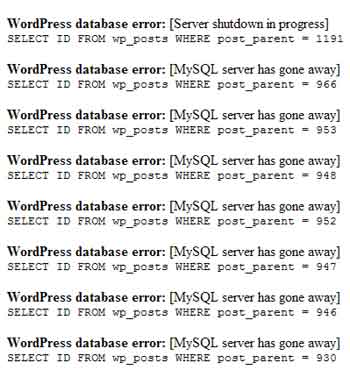
A few minutes ago as I finished the post below and pressed the Publish button this is what my admin area looked like:

Blog Admin Error After Posting

Pretty scary, eh? I just about had a heart attack!

With the mantra “Oh no, oh no, oh no” going through my head, I opened up a new tab in my browser and loaded the site in the hopes that the blog would look normal. You know … that maybe what I saw in the admin area was just a temporary glitch?

No such luck … the front page of the blog looked like this:

Front page of my blog after publishing a post!

After having another heart attack and aging 10 years (gotta get some wrinkle cream now!) I decided to go to my webhost and check C-panel to make sure that my database really hadn’t disappeared.

The database was still there and I could see that it still had comment and post data in it, so i decided to open another new tab in order to load my blog again. I got the same error messages all over the page, so I added wp-admin to the url and I was able to go directly to the admin area.

Much to my relief the admin area looked fine when I got into it. I use a wp-cache for this blog so I went to the settings area and cleared the whole cache for the blog and it looked normal again.

I have no idea what happened, but it sure scared me! This is my oldest and biggest blog. The thought of losing the whole database and possibly the databases for my other blogs really freaked me out.

I just updated this blog to WP 2.6.2 on Saturday. Up until now there’s been no major problems except for the widget area looking strange on occasion. I wrote about that one one of my other blogs if you want to read about the widget problem. You can actually read about how fun it was to update 16 blogs in that post if you’re interested in hearing about my experiment with the WordPress Autoupdate plugin.

At least having just updated my blog I do have recent backups of the database and files.

So I don’t know if this was a problem caused by the new WP 2.6 or if perhaps there was an error on my hosts server when I was publishing my last post. I suppose it could also be a plugin conflict, but I haven’t added any new plugins or updated any since Saturday when I updated WordPress, and I’ve published several posts since then … so that doesn’t make sense as the cause of the problem.

I guess I’ll have to see what happens when I publish this post! Wish me luck!

Has anyone else had a problem like this immediately after publishing a new post? If you have experienced this type or error, did you ever find out what caused it? Any ideas?

Filed Under: Blogging, Software, Web and Technology, Web Hosting, Wordpress, Wordpress Plugins Tagged With: admin, blog, Blogging, cache, cpanel, data, database, databases, error, errors, freaked, freaky, frightening, index, mySql, plugins, post, posting, problem, published, scary, site, Stress, Tech, update, updated, website, Wordpress, yikes

How many hours do you spend on the computer each day?

September 2, 2008 by Tricia

OMG I just realized that I’ve been sitting working on that new store and a couple of other projects for hours and hours! Holy Smokes … if I did that every day I’d have to start taking some of those special fat burners to burn away the calories that I’m not using when I’m just sitting at the computer!

Isn’t it amazing how much time one can waste on the computer? I mean, I don’t think I’m wasting my time, I’m doing some things and working on some projects that should earn me money in the future, but still .. it adds up! Just going through my email and answering a portion of it takes up at least three hours of my day! Arghh!

How much time do you spend on the computer each day or each week?

Filed Under: Blogging, Computers, Internet, Software, The Blogisphere, Web and Technology, Website Promotion Tagged With: computer, day, email, hours, Internet, Money, OMG, portion, project, sitting, Software, time, waste, wasted, web, week

  • 1
  • 2
  • 3
  • …
  • 11
  • Next Page »

Connect with Us

  • Facebook
  • Flickr
  • Instagram
  • RSS
  • Twitter

Categories

Sites of Interest

Useful Links

Eavestrough Cleaning Toronto

Shopping

Gifts, Gadgets,
Books and More!

Recent Posts

  • Is your home well insulated or do you have energy leaks?
  • Pet Safety Tips
  • Top 10 Most Fundamental Yoga Poses For Beginners
  • Will My Interior Décor Stand The Test Of Time?
  • Outdoor Furniture- Spicing Up Your Backyard
  • Ensuring You Have A Good Experience Staying At Hotels With Children
  • Mother’s Day Cookies

Recent Comments

  • Bill on Top 10 Most Fundamental Yoga Poses For Beginners
  • [bonus]old school new body-f4x workout on Why does my husband always bring home the wrong stuff?
  • Rodhe Stevens on 5 Little Known Secrets To Finding Cheap (But Durable) Furniture
  • Julia Carlson on How To Install A Mosaic Tile Kitchen Backsplash
  • Humane Raccoon Deterrent Idea on Helped save a baby raccoon last night

Subscribe


Subscribe to our RSS Feed It's FREE!

Subscribe to Tricia's Musings by Email It's FREE!


Follow me on TWITTER

Find us on Google +


Find us on Facebook


I have two mottos-
1. Live life to the fullest; and
2. Don't have any regrets.

Get More Traffic

Visitors since 2006

Meta

  • Log in
  • Entries feed
  • Comments feed
  • WordPress.org

Search this site

Tags

blog blogs camera Canada Chris computer crohns dinner dog Family flower flowers Food friends funny garden Gardening Green Thumb Sunday Health and Fitness Health Fitness and Beauty holiday home Home and Lifestyle house husband IBD Inflammatory bowel disease Internet Music neighbors pain photo photos plants puppy Shopping sick sleep spring Toronto TV Video visit website Wordless Wednesday

Blogs I Visit

  • Sans Pantaloons
  • Parenting Toys
  • The Domestiquette
  • Home and Garden Diva
  • Captian Picards Journal

Copyright © 2026 · Lifestyle Pro Theme on Genesis Framework · WordPress · Log in