• Home
  • Blog
  • Archives
  • Links
  • About
  • Guest Blogger
  • Contact

Tricia's Musings

Random Thoughts about life in general, living in the big city of Toronto

  • Home and Lifestyle
  • Recreation
  • Health Fitness and Beauty
  • Entertainment
  • Web and Technology


You are here: Home / Archives for Web and Technology / Internet

Great reading at Dan Rua’s Florida Venture Blog

May 31, 2007 by Tricia

I wanted to take a moment today to tell you about Dan Rua’s Florida venture capital blog. Now, I know, I’ve just said venture capital and you’re probably thinking that the blog is all about business and finance. While that certainly is part of what this blog is about, that’s certainly not all.

Dan is a managing partner of Inflexion Partners, and being in the business of venture capital he does talk about some very interesting technology startups from time to time on his blog. If you have an interest in the internet, technology, social media, cool new companies and gadgets then I’m sure that you will enjoy reading about these things on Dans blog.

I really enjoy Dans writing style. I’d been to his blog from time to time over the last 8 months or so, but over the last few days I’ve taken the time to read pretty much all of the posts that he’s written so far this year. His writing style is engaging, and you can tell that he’s quite passionate about Florida, the Florida Gators, Innovative technology that’s developed in Florida and elsewhere, entrepreneurs and enjoys what he gets out of life.

When I read a post like the one he wrote as a recap for the Florida Venture Capital conference I begin to wonder if I’m in the wrong field. He traveled to Boca Raton, stayed in a luxurious resort, got to play golf on a fantastic golf course, had a nice dinner, wine and gambled on a yacht, and of course learned about some new, interesting, and up and coming businesses.

I do hope that you like Dan’s blog as much as I do. If you do I know he’d appreciate it if you’d subscribe to his RSS feed, or his newsletter.

I’ve actually signed up for his newsletter. I signed up because I like his blog and I’d like to be updated about his latest posts or whatever else he might choose to discuss in his newsletter. I’m not sure how often his newsletter comes out, but I suspect it’s once a week or less.

The other reason I signed up for his newsletter is because I have also created an account with the same newsletter program – Z0okoda – that’s he’s using and I haven’t taken the time to set up my newsletter yet. I’d love to see what he does with his newsletter, maybe I’ll steal an idea or two.

As I said, I really enjoy his writing style so I’m sure his newsletter will be both informative and entertaining.

Visit Dan’s blog and play the games. Maybe you’ll get an idea and end up making a game of your own too! While your there spend a bit of time reading the posts. I hope you’ll find that this is a blog worth reading and take the time to subscribe to the newsletter.


Filed Under: Internet, Sales and Marketing, Web and Technology, Website Promotion Tagged With: blog, business, cool new companies, Dan Rua, entertaining, entrepreneurs, Finance, florida, Florida Gators, gadgets, informative, innovative, Innovative technology, Internet, newsletter, RSS feed, social media, subscribe, subscribe to newsletter, subscription, Tech, Technology, Ted Murphy, Venture Capital, Venture Capital blog

Comment problem? Htaccess problem? help!

May 30, 2007 by Tricia

I had been wondering why I hadn’t had any comments between Sunday and Tuesday. I posted enough posts that surely some of you must have tried to comment … at least on my Green Thumb Sunday post. Didn’t you?

Early Sunday morning I put some code in this sites Htaccess file that would create a 301 redirect so that all pages on this site would go to an url with www in the address. It didn’t work well when I just put the code in, so I went to the options area in my blog and changed the blog directory address so that it had a www in the url.

That worked. Ta Da .. when I visited any page on my site the url had www in it. I wanted it that way because this site is a PR5 when the www is in the url, so to consolidate all the links to my site that are out there – some with www and some without I wanted to force the www.

What I didn’t realize was that if someone was visiting an url on the web that had been listed without the www they were automatically sent to the index.php page of this site.

I also just discovered that when I wanted to comment on one of my own posts that it just came up with a blank page when I hit submit. Did you guys encounter that too? Or were you ignoring me for the last couple of days.

Tell the truth, I promise I won’t be hurt if you ignored me.

So I guess I need some help. What I’ve tried to do on my own didn’t work. Julie tried to help me for quite some time last night but the codes she gave me to try didn’t work either. I contact my webhost support and they say “they don’t help people with scripts”. Hmmm nice.

I want this sites url to include the www so I need to do a 301 redirect. Anyone want to give me Htaccess codes that I can try? Please. What I was using didn’t work obviously.

Also, do I need to change anything in my blogs configuration? Maybe my mistake was adding the www to the blog address in the wp dashboards option area? But the code I tried didn’t work without me doing that.

One more thing … if you are a 301 redirect htaccess wizard … what code would I use for our other blogs that are listed as mydomain.com/blog I’ve tried to figure out an htaccess code for them that sets it so that they do NOT have the www in their urls, but I can’t figure that one out. Everything I’ve tried fails.

Help!

Oh and with the minor changes I made my wordpress wasn’t adding new categories anymore either. I only changed the two things that I mentioned. I couldn’t have messed things up that badly could I have?

Filed Under: Internet, Web and Technology, Web Design Tagged With: 301 redirect, blog, blogs, comment, comments, help, Htaccess, need help, no www url, redirect, url, Wordpress, www url

Poyperp0st Direct is best for advertisers and bloggers

May 30, 2007 by Tricia

In the early morning hours of May, 24th, Pay/perp0st launched Pay/perp0st Direct. P Direct, as it’s come to be known in the short time that it has existed, was created to let bloggers interact and accept advertising offers directly from advertisers. Just as the name implies.

Over the last year I’ve work with a number of companies that have been created in order to allow advertisers to use a new form of advertising to promote their companies, services, or products on blogs. Each company is a little bit different from the other in the way that they do business with bloggers and advertisers.

Poy/perp0st direct is the best deal around:

I can only speak as a blogger, as I’ve never signed up with any of these companies to create advertising opportunities of my own. Therefore, from a bloggers standpoint, I have to say that P Direct offers both the blogger and the advertiser the best deal all round. Pay/perP0st direct only charges an extra 10% on top of the fee that the blogger sets as his or her price for a post. 5% of that fee goes towards covering the cost of Paypal and credit card transactions.

I say this because I know that each of these companies either take fees from the bloggers stated price for writing a paid post, or they add fees on top of what the blogger is paid to write an article.

I’ll break it down for you.

The original, and still available Pay/perp0st:

Pay/perp0st still allows bloggers to get paid to bl0g through the system that they began using back in July of 2006. That system allows advertisers to create advertising opportunities for whatever amount they’d like to pay, with the minimum payout to the blogger being $5. The bloggers can then pick and choose which opportunities they’d like to create as a post on their blog.

On Pay/perp0st this method of advertising costs advertisers a $5 service fee whether they create 1 opportunity or several hundred. There’s also a 35% charge on top of each opportunities fee. An advertiser could get 14 posts for $99.50 for a cost of $6.75 per post. The blogger would get $5 for a post that costs the advertiser $6.75.

100% markup at Rev1ewMe

Sites like Rev1ewMe have 100% markup. Tricia’s Musings is listed in the Rev1ewMe marketplace. When an advertiser decides to have me write a post through Rev1ewMe my price per post is listed at $150 at Rev1ewMe. I only get $75 of that fee, and Rev1ewMe gets the rest. I don’t know if Rev1ewMe charges the advertiser any other fees on top of the outright fee of $150 that he or she would have to pay to have me discuss their site or product on this blog.

I believe the lowest price that a blogger can charge at Rev1ewMe is $40, with of course $20 going to the blogger, and $20 going to Rev1ewMe if that bloggers site is chosen for a post.

35% removed from bid price at Sp0nsoredRev1ews

Spons0redRev1ews takes 35% of whatever I bid on any advertising opportunities that are listed in their marketplace. The amount that I bid on Sp0nsoredRevi1ews depends on what the advertiser is asking for, and what price limits they have set.

If an advertiser posts an opportunity and they say they are willing to pay between $10 and $125 for a post, well, I’ll usually bid $80 for a post on this blog. A bid of $80 would pay me $52 for a post if my bid was accepted, with the other 35% going to Sp0nsored Rev1ews. Again, I don’t know if Spons0redRev1ews charges advertisers any other fees on top of the full price bid by each blogger.

The lowest price an advertiser can list on Sp0nsoredRev1ews is $5, but with 35% being taken off the bid it’s really not worth it for a blogger to do a post for $3.25.

There are several other companies out there where advertisers may create writing opportunities for bloggers. The fees vary at each of the companies.

Pay/perp0st Direct:

P Direct is just the first part of a new Pay/perp0st release. I believe the second part will be the creation of a marketplace on Pay/perp0st where advertisers could easily pick and choose which blogs they’d like to offer a direct writing opportunity. I don’t know yet if Pay/perp0st will increase their low 10% service charge for advertisers that use the marketplace, but if they do, I would imagine that it will still be the lowest price of any service.

The way P Direct works at this time is:

1. Bloggers place a P Direct Badge on their site. Mine is located in the top left sidebar.

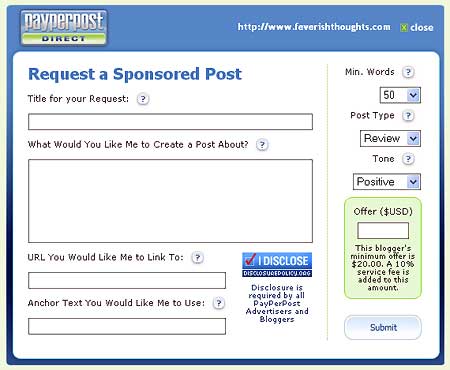
2. If an advertiser, or perhaps another blogger happens across a blog with a Badge on the site, and they decide that they’d like to have that blogger write about their website, company, product or service they can simply click on the badge and a form will pop up that looks like this:

pdirectcreateoffer.jpg

If the form comes up with an error the advertiser should be sure that they are using the address listed in the top right of the pop up form. Sometimes the inclusion or exclusion of the www causes an error. I believe that is fixed now, but if you get an error you know what you should try – check that the url is the same as what’s listed.

3. The advertiser would then fill out the form, listing exactly what they’d like the blogger to write about, and specify the amount of words from 50 to 300, whether the post is a detailed write up, buzz or opinion, and the tone of the post. At this time the tone is set by default to positive, but the an advertiser could choose neutral or negative if they’d like.

Considering that most bloggers write their best posts in a neutral tone, and are not comfortable with being asked to write a positive article my suggestion would be for Pay/perp0st to make the default tone neutral. I for one prefer neutral requests.

The lower right corner of the offer form clearly states what the bloggers minimum fee is set at, and that there will be a 10% charge on top of the fee offered.

At this time I’ve set my fee at the low price of $20. I believe this is an excellent price for a detailed article such as this one on a popular blog.

An advertiser using P direct to request a post would be charge 10% on top of my $20 charge for a total cost of $22. Considering that an advertiser would pay 35% to 50% more, plus possible service fees either through regular Pay/perp0st, Rev1ewMe, Sp0nsored Rev1ews, or another service I think this is a pretty good deal.

4. Once an advertiser has finished creating their P Direct offer they would hit the submit button and I believe they will be taken to the Pay/perp0st website where they can either sign in with their existing advertising account information, or create a brand new advertising account. The advertiser would also have to deposit money into their advertising account to cover the cost of the offer they just created. I believe that an advertiser can use a credit card or Paypal for their payment.

5. The blogger would then be sent an email message telling them that they have a new P Direct offer. To discover exactly what the offer is the blogger would have to sign into their Pay/perp0st account and visit the P Direct area by clicking on the Opportunities tab in the dashboard.

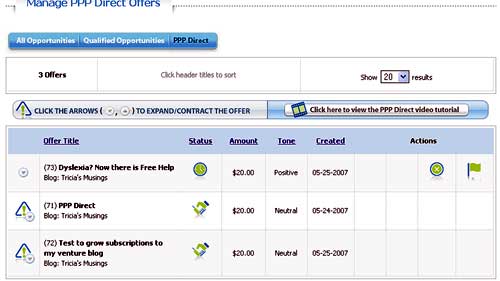
The P Direct area as viewed by a blogger:

pdirectpage.jpg

6. They would be able to see any P offers that they have waiting once they reach the P Direct area. A blogger could use the arrow buttons on the left of each offer to expand one offer at a time in order to see the specific offer.

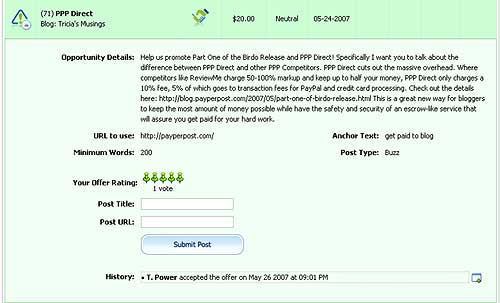
Here’s what this P Direct offer looked like:

pdirectoffer.jpg

7. The blogger could accept the opportunity immediately or, if a blogger decided that the request deserved a higher price due to amount of words or links requested, or would prefer a different tone of post than was requested by the advertiser they could click on the negotiate button and send a message to the advertiser, to which the advertiser would have to respond in order for the blogger to be able to accept or decline the offer.

To learn more about how the P Direct system works for advertisers and bloggers you can view the video in this Pay/perp0st Direct blog post. The video is an excellent tutorial and I only wish that they had more tutorial videos throughout the whole Pay/perp0st website.

Why use P Direct?

Now the big question. Why would a blogger and advertiser use this system rather than deal with each other directly? For security reasons of course. Pay/perp0st offers the security and safety of an escrow-like service.

The money deposited for the post is held while the blogger writes the post. The advertiser has up to four days from the time the completed post is submitted to decide if they approve of the post or not. During that time period the advertiser could also request changes to the post if necessary. Payment is made to the blogger when the advertiser is happy with the post, or once the four day time period elapses.

Sure, bloggers and advertisers could deal directly with each other but what happens if payment isn’t made when stated or when one party isn’t happy. Wouldn’t it be nice to have the security of that middleman?

Filed Under: Cool stuff, Internet, Make Money, Money, Sales and Marketing, Services, The Blogisphere, Web and Technology, Website Promotion, Writing Tagged With: amount of words, blogger, business, card payment, company, credit, credit tone, deal, email, information, low price, lowest charge, lowest price, media, Money, negative tone, neutral tone, offer, paypal, paypal payment, positive tone, posts, price, prices, Product, promote, service, service charges, service fees, special, special deal, special price, style, Video, visit, website, words, write, Writing

Don’t forget about the Do follow blogroll!

May 25, 2007 by Tricia

I just wanted to remind everyone that if you are an I follow or do follow blogger that you are eligible to join the Do follow blogroll that I created about five weeks ago.

There are close to 160 blogs listed on this blogroll already. It’s going to be huge!

How do you become a do follow blogger? It’s pretty easy really. Simply remove the nofollow tags from the comment area of your template.

Most blogging platforms come with nofollow tags built into the comment area. This was originally thought to be a way to deter spammers because their links wouldn’t be picked up by the search engines when they had the nofollow tag immediately placed on them.

Today, most blogging platforms have plugins or modules that can be added to them that catch spam and stop it before it gets into your blogs comment section. Blogging platforms that don’t have the ability to add these special modules or plugins can still put comments on moderation to prevent spam from reaching the blog.

So that kind of makes the nofollow tags obsolete doesn’t it.

I removed my nofollow tags about a year ago because I wanted to allow anyone who left me a comment a real link. By this I mean, without the nofollow tags the search engines would be able to find the link that the commenter left when they created their comment and they’d gain a backlink to their site on the search engines as a result.

If you aren’t sure what a backlink is please click on the link I just included for the word Backlink above.

So, if you are an I follow blogger that means you are rewarding those who stop to leave you a comment.

As I was saying, to qualify for the do follow blogroll, nofollow tags must be removed from your comment area, and your comment section should NOT be closed to only registered members. Visit the Do Follow blogroll page to learn more about the blogroll, then, if you are interested leave me a message and I’ll send you an email that includes the blogroll code and further instructions.

______________________________________

If you are already on the Do follow blogroll, or if you’ve come across it in some of the D-Lists that are going around, please do not abuse the sites you visit by leaving poor comments.

Comments such as “nice post”, “funny ha ha” and so on do not really add to the post, and when a person goes around to 50 or 100 sites leaving short little comments such as that it looks like they are doing it only to gain the back links that we, do follow bloggers, offer.

Yes there are times when short one line comments are appropriate, but I see too many of them, especially on all my sites on the same day, by the same person? Sorry, I delete them.

I enjoy valid comments on my site. By valid comments I mean ones that actually add to the posts conversation in some way. Share your own experience of what the blogger is posting about in your comment, add facts, or opinions, but please don’t just say “Nice Post”.

Filed Under: Internet, Linky Love, The Blogisphere, Web and Technology Tagged With: blog, blogger, Blogging, Blogroll, blogs, comment, Do follow, do follow bloggers, do follow blogroll, email, I follow, nofollow tags, open comments, plugin, posting, posts, remove nofollow tags, search engine, search engines, Spam, valid comments

Have a trade show or an event and need to rent computer equiptment?

May 25, 2007 by Tricia

Own or manage a business?

Have you ever had computer equipment break down, or perhaps found that you needed extra computer equipment, but only for a short period of time? Have you thought of looking into computer rentals? ComputerRentals.com has been in business for over 25 years and is one of the oldest and most respected names in computer rentals throughout the US and Canada.

I can think of many reasons why a company might feel the need to rent computer equipment. Perhaps there’s a trade show coming up and you can’t afford to remove the computer equipment that you need for the trade show or convention from your offices? Rent it.

Perhaps your company has a large project and you temporarily hire a number of new employees? Should you purchase new computer equipment even though the new hires will only be working with the company for 6 months or less? It’s probably not a good idea as it will increase your companies cost layout for the project. Why not rent the computer related equipment that you need?

Along with the above listed reason for renting computer equipment you might have a short off-site employee training session that you need to provide computer equipment for, a short customer research project, or perhaps you’re moving offices but you decide to rent computer equipment for the new office to smooth the transition from one office to another? See, there’s probably hundreds of reason to rent equipment.

I know that when I worked with a plastic surgeon a few years ago I was there in the beginning helping him set up his new clinic from the ground up. We rented computer and other office equipment for the first couple of months until he fully moved his practice from his former office to his brand new clinic. Renting computer equipment was one of the best things that we did to get the office up and running quickly.

CRE can provide your business with short term computer rentals in the form of the latest PC or Mac desktops, laptops, plasma and LCD display rentals, and audio visual equiptment. You can also rent accessories for these products such as floor stands, DVD/VCR combo players, and audio speaker rentals.

If you manage and office or business do visit the ComputerRentals.com site so that you can see for yourself what kinds of computer rentals are available for your business needs.

Filed Under: Computers, Internet, Photography, Web and Technology Tagged With: audio speaker rental, audio visual equipment rental, business, computer, computer accessory rental, computer equipment, computer rentals, computer rentals for events, ComputerRentals.com, DVD VCR combo rental, floor stand rental, laptop rentals, lcd display rental, Mac desktop rental, marketing, PC desktop rental, plasma rental, rent computer for trade shows, sales, short term computer rentals, Technology

  • « Previous Page
  • 1
  • …
  • 17
  • 18
  • 19
  • 20
  • 21
  • …
  • 24
  • Next Page »

Connect with Us

  • Facebook
  • Flickr
  • Instagram
  • RSS
  • Twitter

Categories

Sites of Interest

Useful Links

Eavestrough Cleaning Toronto

Shopping

Gifts, Gadgets,
Books and More!

Recent Posts

  • Is your home well insulated or do you have energy leaks?
  • Pet Safety Tips
  • Top 10 Most Fundamental Yoga Poses For Beginners
  • Will My Interior Décor Stand The Test Of Time?
  • Outdoor Furniture- Spicing Up Your Backyard
  • Ensuring You Have A Good Experience Staying At Hotels With Children
  • Mother’s Day Cookies

Recent Comments

  • Bill on Top 10 Most Fundamental Yoga Poses For Beginners
  • [bonus]old school new body-f4x workout on Why does my husband always bring home the wrong stuff?
  • Rodhe Stevens on 5 Little Known Secrets To Finding Cheap (But Durable) Furniture
  • Julia Carlson on How To Install A Mosaic Tile Kitchen Backsplash
  • Humane Raccoon Deterrent Idea on Helped save a baby raccoon last night

Subscribe


Subscribe to our RSS Feed It's FREE!

Subscribe to Tricia's Musings by Email It's FREE!


Follow me on TWITTER

Find us on Google +


Find us on Facebook


I have two mottos-
1. Live life to the fullest; and
2. Don't have any regrets.

Get More Traffic

Visitors since 2006

Meta

  • Log in
  • Entries feed
  • Comments feed
  • WordPress.org

Search this site

Tags

blog blogs camera Canada Chris computer crohns dinner dog Family flower flowers Food friends funny garden Gardening Green Thumb Sunday Health and Fitness Health Fitness and Beauty holiday home Home and Lifestyle house husband IBD Inflammatory bowel disease Internet Music neighbors pain photo photos plants puppy Shopping sick sleep spring Toronto TV Video visit website Wordless Wednesday

Blogs I Visit

  • Rainydazeee.com
  • Shopping Maniac
  • BlogTO
  • Eavestrough Cleaning Toronto
  • Ah Ok Lah

Copyright © 2026 · Lifestyle Pro Theme on Genesis Framework · WordPress · Log in