• Home
  • Blog
  • Archives
  • Links
  • About
  • Guest Blogger
  • Contact

Tricia's Musings

Random Thoughts about life in general, living in the big city of Toronto

  • Home and Lifestyle
  • Recreation
  • Health Fitness and Beauty
  • Entertainment
  • Web and Technology


You are here: Home / Archives for Web and Technology / Blogging

Promote your sites and articles on Quassi

June 7, 2008 by Tricia

I just joined a new site called Quassi.

It’s a new kind of site where you can promote not only your own sites but topics that you are knowledgeable about as well.

In addition to having yet another place to promote your sites you can also participate in revenue sharing at Quassi.

Here’s some information directly from the site:

At Qassia, you can add your websites for free, and without having to add reciprocal backlinks. You’ll get unlimited quality backlinks (as opposed to useless “no-follow” backlinks). You can also add intel. Short for “intelligence”, intel is a tidbit of information. Qassia rewards users who add intel in three ways.

1. Backlinks You get one backlink for every piece of intel you add. Every intel will carry a direct backlink to one of your sites. So the more intel you add, the more backlinks you get.

2. Credit When you add intel, you also get credit, in the form of Qassia dollars. Your net worth in Qassia dollars determines how well your websites rank in our directory.

3. Revenue When your intel is displayed, you get 100% of the advertising revenue generated by that page. That is not a typo, by the way: we give you ALL of the gross ad revenue.

This means that website owners have triple incentive to contribute intel. The contributed intel will allow Qassia to become a vast repository of intelligence, with unrivaled original content. And a vast amount of original content draws traffic like honey draws ants.

Right now Quassi is in closed beta so the only way to join is by getting an invite by someone who’s already a Quassi member. If you’re interested in joining just click on one of the Quassi links that I’ve added to this post and it should take you to my profile page where you should see a Sign Up button in the top left hand sidebar.

I just signed up so I can’t tell you how well Quassi does at promoting your site and bringing in traffic yet, but I’ll write an update post about a month from now and let you know how well Quassi has worked for me. In the meantime, sign up and list your sites and perhaps add some articles about topics you care about and start earning those quassi credits and sharing in the site revenue.


Filed Under: Affiliates, Blogging, Cool stuff, Internet, Make Money, Web and Technology Tagged With: add articles, advertising revenue, backlink, backlinks, beta, content, incentive, intelligence, Make Money, member, net worth, profile, promote sites, Quassi, quassi credits, revenue share, rewards, three ways, tidbit, traffic, website, websites rank

aLinks WordPress plugin creates automatic links within posts

June 6, 2008 by Tricia

A few days ago I downloaded a WordPress plugin called aLinks. This plugin has been around for a while, but I’d never thought to try it until now, even though Lucia from Big Bucks Blogger was singing it’s praises last September. I should have tried it earlier! This plugin has a ton of potential.

Bloggers link to lots of sites in their posts. They link to their blogging friends, they link to past posts, they link to great websites they’ve just discovered and some even add affiliate links to their posts. It’s just something we do. I’ll even go so far as to bet that most of the bloggers reading this post likely link to at least one site in just about every post they write.

Why not make linking easier?

The aLinks plugin has been designed so that you can set up a link within the plugins admin area and then never have to hyperlink to that phrase every again!

I haven’t set up the plugin on this blog yet as I wanted to try it on one of my smaller less trafficked blogs first while I test to see if it causes any CPU over use problems on my server. (remember last year I went through two web hosting companies because my sites were using too much of the shared servers memory!)

If you’d like to see what one of the links looks like once it’s set up check out this post on My World. I used the built in Amazon module to quickly create a link to an Amazon page that sells dog beds. Now whenever I write the words dog bed in a post on My World it will automatically link to that Amazon page for me. Not only that, but I set up the aLinks plugin so that it will find any of my past posts that have any of the keyword phrases that I created and it will add the links to them too.

I have a number of blogs and I make references to them occasionally so I spent a few minutes setting up automatic links for my various blogs. Now all I have to do is type in the name of one of my blogs and when I publish my post the link to whichever blog I mentioned will appear. Just that alone will save me some time.

Considering that I have so many blogs I also appreciate the export/ import feature. Once you create your list of keyword phrase links you can import them to another blog using the plugin. That’s going to come in handy once I’m done setting up the first blog I’m trying aLinks on!

This plugin has too many great features for me to describe in one post.

I’ll just finish by telling you that you can add modules to the plugin for a few affiliate programs such as eBay, Clickbank, Commission Junction, iTunes and several others, as well as one for Wikepedia. This means that along with the built in Amazon module you’ll be able to monetize your blog by scattering a few links to products you’re happy recommending. Link the word “book” to Amazons bestseller page and anytime you use the word book in a post you’ll automatically have a link that could earn you money.

The aLinks plugin has been updated recently to work with WordPress 2.5.1 so if you’re a WordPress Blogger consider giving this plugin a try.

Update – I don’t use this plugin anymore because it stopped working and there doesn’t seem to be anymore updates. In fact creators page no longer seems to exist. Sorry!

Filed Under: Affiliates, Blogging, Cool stuff, Internet, Linky Love, Make Money, Wordpress, Wordpress Plugins Tagged With: add affiliate links, affiliate, aLinks, amazon, automatically add links to posts, bestseller, blog, blogger, bloggers, Blogging, Clickbank, commision junction, computer, deep links, dog beds, easy links, Ebay, export import, few minutes, free, frequently used links, hyperlink, import feature, iTunes, keyword, keyword phrases, Make Money, module, monetize blog, monetize posts, phrase, post, posts, Technology, web, web hosting companies, Wikipedia, Wordpress, Wordpress Plugin

Technorati widget acting up

May 30, 2008 by Tricia

Has anyone else noticed that their Technorati widget is acting up?

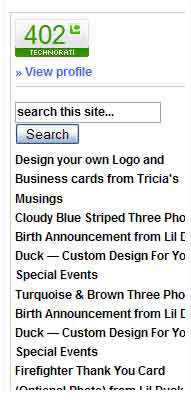
Early yesterday morning I noticed that the Technorati widget on a few of my blogs was showing a huge list of websites within it.

I don’t have my Technorati widget set up to show tags or anything other than my profile link, the sites authority and a Technorati search box. However my widget appears to be showing a list of sites that either I’ve faved or that have faved my blog. There isn’t even an option for the widget to show anything like that, so this is very strange.

technoratiwidget.jpg I went to Technorati and search the discussions in the help section and their weblog to see if anyone else had mentioned that their widget looked odd, but I haven’t found any mention of it.

Yet, as I’ve surfed the net I’ve seen the widget acting up on other peoples blogs.

Luckily I’ve only got the widget set up to show on the main page of my blog. It looks ugly! I hope they fix this problem.

If you’re using the Technorati widget on your blog go and take a look and see if yours looks odd too.

I wonder if you have to have the widget on your site to continue to stay listed in Technorati or not?

Filed Under: Blogging, Internet, The Blogisphere, Web and Technology, Wordpress Tagged With: acting up, anyone else noticed that, blog, blogs, computer, help section, huge list, list of fav sites, problem, profile, profile link, search box, showing faves, strange, Technology, Technorati, ugly, web, weblog, website, widget, wierd, yesterday morning

Tricia’s Musings has a new look

May 17, 2008 by Tricia

Well … what do you think of the new look of Tricia’s Musings?

I’ve been downloading and testing WP themes for months in order to find just the right one for this site. I finally decided on this theme about a week ago.

The only problem I’m having with it is that I can’t figure out how to put a header image in it without dropping the sub-navigation bar. I’m sure I’ll figure out how to put in a custom header eventually.

Please let me know if this theme doesn’t work well with you browser. I’ve tested it on the latest version of FireFox and Internet Explorer 7 and I’m pleased with how it’s performing.

I’m planning on organizing the sidebars a bit better and I’ll utilize some of the special options in this theme such as featured video and featured posts shortly. It’s really a great theme. It was a custom theme but the designer decided to offer it up for free at the end of April. I love it and I hope that you do too.

I was supposed to have a custom theme made for this site. I won it in November, but my latest emails to the designer have gone unanswered and I couldn’t wait any longer. I’m pretty disappointed with how things worked out. If she does ever get in touch with me perhaps I’ll use whatever theme she came up with on one of my other sites.

Filed Under: Blogging, Web and Technology, Web Design, Wordpress Tagged With: browse, browser, custom, custom header, design, designer, email, featured posts, featured video, firefox, free, free theme, header, header image, Internet, internet explorer 7, look, lots of options, navigation bar, new, new look, new theme, November, organizing, problem, sidebar, sidebars, sites, special, Technology, testing, Tricias Musings, trouble with header, Video, web, WP, WP theme

Need a better way of keeping track of site earnings

May 16, 2008 by Tricia

You know I was just thinking about what a mess doing my taxes was this year. Last year wasn’t so bad because I’d worked at the hospital part of the year before and also earned money from my websites. Last year though, all my income was from my websites and calculating everything was a pain in the butt.

I think I’m going to look into getting some kind of financial reporting software so I can keep track of my daily, monthly and yearly earnings in one place. I do have Excel on my computer, but I’ve just never really liked using that program.

Speaking of earnings mine are down so far this year. Ever since we got our Puppy last November my earnings have been a lot less. I find the puppy very distracting. She’s getting better at entertaining herself, but it’s still difficult to work on my sites with a dog dropping toys in my lap constantly or whining for attention. As a result I’ve been trying to work on more passive income earnings for my websites.

How do you get work done on your sites when you have a lot of distractions around?

Filed Under: Blogging, Finance, Great Sites, Home and Lifestyle, Our Puppy Tagged With: computer, constant, distract, distracting, dog, dropping toys, earnings, entertaining, excel, financial reporting software, Hospital, ill, income, Internet, keep track, last november, mess, Money, my sites, November, pain in the butt, passive income, puppy, site earnings, spreadsheet, taxes, Technology, toys, web, website, websites, whining, work

  • « Previous Page
  • 1
  • …
  • 7
  • 8
  • 9
  • 10
  • 11
  • …
  • 32
  • Next Page »

Connect with Us

  • Facebook
  • Flickr
  • Instagram
  • RSS
  • Twitter

Categories

Sites of Interest

Useful Links

Eavestrough Cleaning Toronto

Shopping

Gifts, Gadgets,
Books and More!

Recent Posts

  • Is your home well insulated or do you have energy leaks?
  • Pet Safety Tips
  • Top 10 Most Fundamental Yoga Poses For Beginners
  • Will My Interior Décor Stand The Test Of Time?
  • Outdoor Furniture- Spicing Up Your Backyard
  • Ensuring You Have A Good Experience Staying At Hotels With Children
  • Mother’s Day Cookies

Recent Comments

  • Bill on Top 10 Most Fundamental Yoga Poses For Beginners
  • [bonus]old school new body-f4x workout on Why does my husband always bring home the wrong stuff?
  • Rodhe Stevens on 5 Little Known Secrets To Finding Cheap (But Durable) Furniture
  • Julia Carlson on How To Install A Mosaic Tile Kitchen Backsplash
  • Humane Raccoon Deterrent Idea on Helped save a baby raccoon last night

Subscribe


Subscribe to our RSS Feed It's FREE!

Subscribe to Tricia's Musings by Email It's FREE!


Follow me on TWITTER

Find us on Google +


Find us on Facebook


I have two mottos-
1. Live life to the fullest; and
2. Don't have any regrets.

Get More Traffic

Visitors since 2006

Meta

  • Log in
  • Entries feed
  • Comments feed
  • WordPress.org

Search this site

Tags

blog blogs camera Canada Chris computer crohns dinner dog Family flower flowers Food friends funny garden Gardening Green Thumb Sunday Health and Fitness Health Fitness and Beauty holiday home Home and Lifestyle house husband IBD Inflammatory bowel disease Internet Music neighbors pain photo photos plants puppy Shopping sick sleep spring Toronto TV Video visit website Wordless Wednesday

Blogs I Visit

  • Get WebStyle
  • Casual Slack
  • Rainydazeee.com
  • Organic Gardening Tips
  • Eavestrough Cleaning Toronto

Copyright © 2026 · Lifestyle Pro Theme on Genesis Framework · WordPress · Log in