• Home
  • Blog
  • Archives
  • Links
  • About
  • Guest Blogger
  • Contact

Tricia's Musings

Random Thoughts about life in general, living in the big city of Toronto

  • Home and Lifestyle
  • Recreation
  • Health Fitness and Beauty
  • Entertainment
  • Web and Technology


You are here: Home / Archives for 2007

Archives for 2007

Get the Atomic Alarm Clock for your computer

June 4, 2007 by Tricia

If you want to get more organized, or if you are the type of person why likes to keep track of things such as appointments, birthdays and other events you might be interested in visiting the Atomic Alarm Clock – home page. The atomic Alarm Clock was created to be an advanced replacement for the Windows tray clock.

You can install a copy of the Atomic Alarm clock and use on your desktop as an actual alarm clock, or even as an event reminder. The Atomic Alarm clock is fully customizable. You can set it up to remind you of multiple events, perhaps with a pop up window or by playing a sound or an MP3 file.

Actually it seems that a number of people are using the Atomic Alarm clock as a real alarm clock. Why? Well, I think they are doing so because it’s so easy to customize. You can set it up to play an MP3 at a certain time each morning to wake you up, or it can play any sound that you like. You can also set the clock so that the alarm only works from Monday to Friday and doesn’t wake you up on Saturdays and Sundays when you want to sleep in.

It’s quite a versatile program.

One thing that I like about the Atomic Alarm clock is that you can download over 100 different skins in order to customize the look and feel of the Atomic Alarm Clock.

Here’s some of the skins that you can download:

clock_b.gif

If you’d like to try the Atomic Alarm clock you can download clock right here.

The Atomic Alarm Clock comes with multilingual interface support, and you can display the ti for any time zone. Check it out.


Filed Under: Computers, Software, Web and Technology Tagged With: alarm, alarm clock, appointment, Atomic alarm clock, Birthday, computer, custom, customize, download, MP3 alarm, organize, play MP3, program, replace windows clock, skin, skins, sleep, Software, sound

Putting Chris to bed

June 4, 2007 by Tricia

I just had to coax Chris to go to bed. All week he’s working the early shift so he’s got to get up at 5 a.m.. Yikes! Of course, Ottawa and Anaheim are playing the fourth? Stanley Cup finals game tonight.

He would have stayed up to watch the whole game if he could have, and when Anaheim took the lead in the 2nd period he wanted to. I was keeping my fingers crossed that Ottawa would tie up the game because I knew I’d be able to coax him to get to bed if the game was at least tied.

Ottawa did tie it up so he’s in bed now. That’s a good thing too ’cause Anaheim just took the lead again!

Yes you read that right. I actually left the hockey game on even though Chris has gone to bed. I don’t know why … well other than the fact that I hope Ottawa wins this game too! Hey, it’s my home town, I gotta hope the Sens win!

Filed Under: Canada, Culture, Life with Chris, Recreation, Sports, Television Tagged With: Chris, finals, game, hockey, Hockey game, in bed, Ottawa, Stanley Cup, the game, watch, win

Adding video content to more of our sites

June 4, 2007 by Tricia

I’m totally loving The News Room. See the post I wrote below about it.

I’ve been going over the News Room site and I found some great video of Paris Hilton going to jail that I put up on Celebrity Scoop. I can really see having a daily entertainment video feature on my celebrity website.

Now I’m going through the site to see if I can find items that Chris can use on Odd Planet (ie weird news) or his music and guitar related site Guitar Licks.

The content that we can put in our sites by using the News Room is fantastic. I’m so happy I joined the site.

Before I go hog wild on this let me ask you something:

If you visit a website that has video on it are you as likely to watch the video if it appears to be something that interests you as you might be to read a plain text post?

Filed Under: Culture, Entertainment, Recreation, Services, Video, Web and Technology Tagged With: add video, celeb, celebrity, celebrity scoop, Chris, Entertainment, guitar, interests, Join, news, news room, odd planet, read, Video, visit, watch, website

Add current news video and feeds to your post and make money

June 4, 2007 by Tricia

I just signed up with a site called The News Room. This website allows website owners to publish news content on their sites. Not only does The News Room provide content that you can use to enhance your posts, but it also allows you to earn some money just by using the service.

So how do you make money by using The Newsroom? It’s simple really. Just sign up for the service and then browse through the current news listings until you find news that’s relevant to your site, or find a piece that is something you’d like to post about and add a feed or video to your article.

CPM (cost per thousand) starts at $1 which means that for every thousand views you’ll be paid a dollar – at the very lowest, for the content that you chose to provide on your site. You might also be interested to know that the payout for placing a video feed on your site is $4 per CPM. This payout is excellent compared to many other affiliate type programs, and what’s more, you’ll be adding content to your site that will enhance your articles.

One of the really cool things about The News Room is that if someone visits your site and they like the news story that you’ve posted they can take a copy of it right from your site. That’s called Mashing. You’ll make some money when they Mash a story from your site too.

For example, I decided to post this news video in this post to demonstrate to you how you can use news content in your articles, and to show you how the story can be mashed from my site.

You know that artist that gets large groups of people to pose naked for photographs in public places? Well he did it again. If you watch the video I don’t think you’ll find anything offensive on it – naked body parts have yellow dots on them.

Do you see that Mash symbol? Well, if you want to put this content on your site too, you can just Mash it.

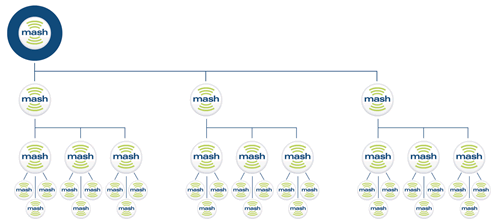
How does mashing work? The diagram that I’ve included below shows how a person can make money when a great news story is shared from site to site:

33_mash.gif

There’s yet another bonus to this program:

I’m not sure how this works, but there’s a loyalty program that allows those who use the site to provide content on their own websites a chance to win prizes such as vacation, electronics and even cars.

When I first signed up I spent some time on the site trying to find out exactly how to get the video on my site. It’s simple really. As I said earlier, just browse through the sites content, find something that you want to add to your site, decide if you want just the video news story, a full feed of the section you’re in, a text story or even make up your own feed of news stories then hit the Mash button and follow the instructions. Easy.

There are hundreds of thousands of news stories to choose from and all are fully licensed new stories from major content providers such as Reuters, Associated Press and so on.

Give it a try. There’s lots of great news content available and you can earn money by adding it to your site. Start by mashing the video that I placed in this post if you like.

Filed Under: Affiliates, Cool stuff, Culture, Entertainment, Make Money, Sales and Marketing, Services, Video, Web and Technology Tagged With: add feed, add news, add news video to articles, add video, affiliate, articles, enhance articles, enhance posts, Make Money, make money using video, media, Money, posts, The News Room, use video in post, Video, viral content, watch, website, win prizes

Trillium Grandiflora

June 3, 2007 by Tricia

Join Green Thumb Sunday
Join

White Trillium bud

I took this photo a few weeks ago.

This is a trillium flower. The trillium is Ontario’s provincial flower, and Ontario is the Canadian province that I live in. It’s illegal to pick or dig up wild trilliums here. Why? Well, it takes forever for them to grow. They do not reproduce easily.

This of course is a trillium in my garden. It’s not a wild trillium. No, it’s a cultivated or hybrid trillium.

It’s supposed to be white but when it blooms the flowers are a deep maroon, almost brown in fact. Perhaps it was labeled wrong at the nursery and isn’t a true Trillium Grandiflora. I do have photos of it’s bloom but they are still on my camera. I’ll have to upload them to my computer soon!

Gardeners, Plant and Nature lovers can join in every Sunday, visit As the Garden Grows for more information.

Filed Under: Gardening, Green Thumb Sunday, Hobbies, Photography, Recreation, Tricia's Garden Tagged With: bloom, camera, canadian, computer, digital camera, flower, flowers, garden, Gardening, green thumb, Green Thumb Sunday, illegal, illegal to dig up, illegal to grow, illegal to pick, nature, Ontario, photo, Photography, photos, plant, plants, province, provincial flower, slow growing, Trillium, Trillium grandiflora, white, wild

  • « Previous Page
  • 1
  • …
  • 111
  • 112
  • 113
  • 114
  • 115
  • …
  • 202
  • Next Page »

Connect with Us

  • Facebook
  • Flickr
  • Instagram
  • RSS
  • Twitter

Categories

Sites of Interest

Useful Links

Eavestrough Cleaning Toronto

Shopping

Gifts, Gadgets,
Books and More!

Recent Posts

  • Is your home well insulated or do you have energy leaks?
  • Pet Safety Tips
  • Top 10 Most Fundamental Yoga Poses For Beginners
  • Will My Interior Décor Stand The Test Of Time?
  • Outdoor Furniture- Spicing Up Your Backyard
  • Ensuring You Have A Good Experience Staying At Hotels With Children
  • Mother’s Day Cookies

Recent Comments

  • Bill on Top 10 Most Fundamental Yoga Poses For Beginners
  • [bonus]old school new body-f4x workout on Why does my husband always bring home the wrong stuff?
  • Rodhe Stevens on 5 Little Known Secrets To Finding Cheap (But Durable) Furniture
  • Julia Carlson on How To Install A Mosaic Tile Kitchen Backsplash
  • Humane Raccoon Deterrent Idea on Helped save a baby raccoon last night

Subscribe


Subscribe to our RSS Feed It's FREE!

Subscribe to Tricia's Musings by Email It's FREE!


Follow me on TWITTER

Find us on Google +


Find us on Facebook


I have two mottos-
1. Live life to the fullest; and
2. Don't have any regrets.

Get More Traffic

Visitors since 2006

Meta

  • Log in
  • Entries feed
  • Comments feed
  • WordPress.org

Search this site

Tags

blog blogs camera Canada Chris computer crohns dinner dog Family flower flowers Food friends funny garden Gardening Green Thumb Sunday Health and Fitness Health Fitness and Beauty holiday home Home and Lifestyle house husband IBD Inflammatory bowel disease Internet Music neighbors pain photo photos plants puppy Shopping sick sleep spring Toronto TV Video visit website Wordless Wednesday

Blogs I Visit

  • Beautiful British Columbia
  • Shopping Maniac
  • Eavestrough Cleaning Toronto
  • Captian Picards Journal
  • BlogTO

Copyright © 2026 · Lifestyle Pro Theme on Genesis Framework · WordPress · Log in